BUY — YouLearn is a strong buy for heavy study workflows after the free plan confirms that its summaries, tutor responses, and practice materials match your course needs.
YouLearn turns PDFs, YouTube videos, slides, websites, text, audio, and recorded lectures into a connected study system with notes, AI tutoring, flashcards, quizzes, practice tests, podcasts, and learning spaces.
Best forCollege students, medical and graduate learners, exam preparation, teachers, researchers, and professionals learning from mixed source materials.
Think twice ifYou need guaranteed academic accuracy, cannot upload course materials for privacy reasons, or only want a simple generic chatbot.
Table of Contents
How the tool fits real work
Add the source
Upload a file, paste a link or text, or record a lecture so the study system begins with your real material.
Understand and organize
Review chapters, notes, summaries, and source-grounded tutor answers inside a persistent learning space.
Practice actively
Use flashcards, quizzes, exams, and podcasts to find weak spots and reinforce the material.
How this review was prepared: StackSelectLab evaluated YouLearn through its official website, application landing page, current terms, privacy information, pricing references, and educational product documentation. The interface images in this article are served directly from the media system used by YouLearn. We did not complete a controlled semester-long learning study, so claims about time saved, retention, and exam performance should be treated as product positioning rather than guaranteed outcomes.
YouLearn AI review: the short answer
YouLearn is an AI tutor and study workspace that turns a learner’s own materials into notes, summaries, interactive chat, flashcards, quizzes, practice exams, podcasts, and other review formats. A student can upload a PDF, add a YouTube video or website, paste text, import slides, upload audio or video, or record a lecture. YouLearn then processes that material and builds a study environment around the actual source instead of relying only on generic chatbot knowledge.
The main attraction is workflow consolidation. Without a tool like YouLearn, a student may need one service for transcription, another for PDF chat, a flashcard app, a quiz generator, a podcast tool, and a separate place to organize everything. YouLearn attempts to connect those activities inside one learning space, with an AI tutor available for follow-up questions and references to the source material.
Our verdict: YouLearn earns 4.7 out of 5. It is one of the stronger AI study platforms for learners who work from long PDFs, recorded lectures, YouTube lessons, slides, and mixed course materials. The free plan is useful for light testing, while Pro is more practical for serious exam preparation. The main cautions are AI accuracy, the need to review generated questions and flashcards, upload privacy, subscription renewal terms, and the risk of replacing active learning with passive summaries.
Who YouLearn is best for
- College and university students studying from lecture slides, long readings, recorded classes, and YouTube explanations.
- Medical, legal, and graduate students who need to process large volumes of dense material and generate repeated practice.
- Exam-focused learners who want flashcards, quizzes, practice tests, and weak-spot review rather than summaries alone.
- Teachers and course creators who want to turn existing lessons into alternative review formats for students.
- Lifelong learners and professionals using webinars, research papers, books, and videos to learn a new subject.
- Commuters and audio learners who want podcast-style study content generated from their notes or course files.
YouLearn is less suitable when exact academic accuracy must be accepted without review, when the materials are highly confidential, or when a learner only wants a simple manual flashcard system. It is also unnecessary for people who rarely study from their own files and are satisfied with a general-purpose AI chatbot.
What YouLearn actually does
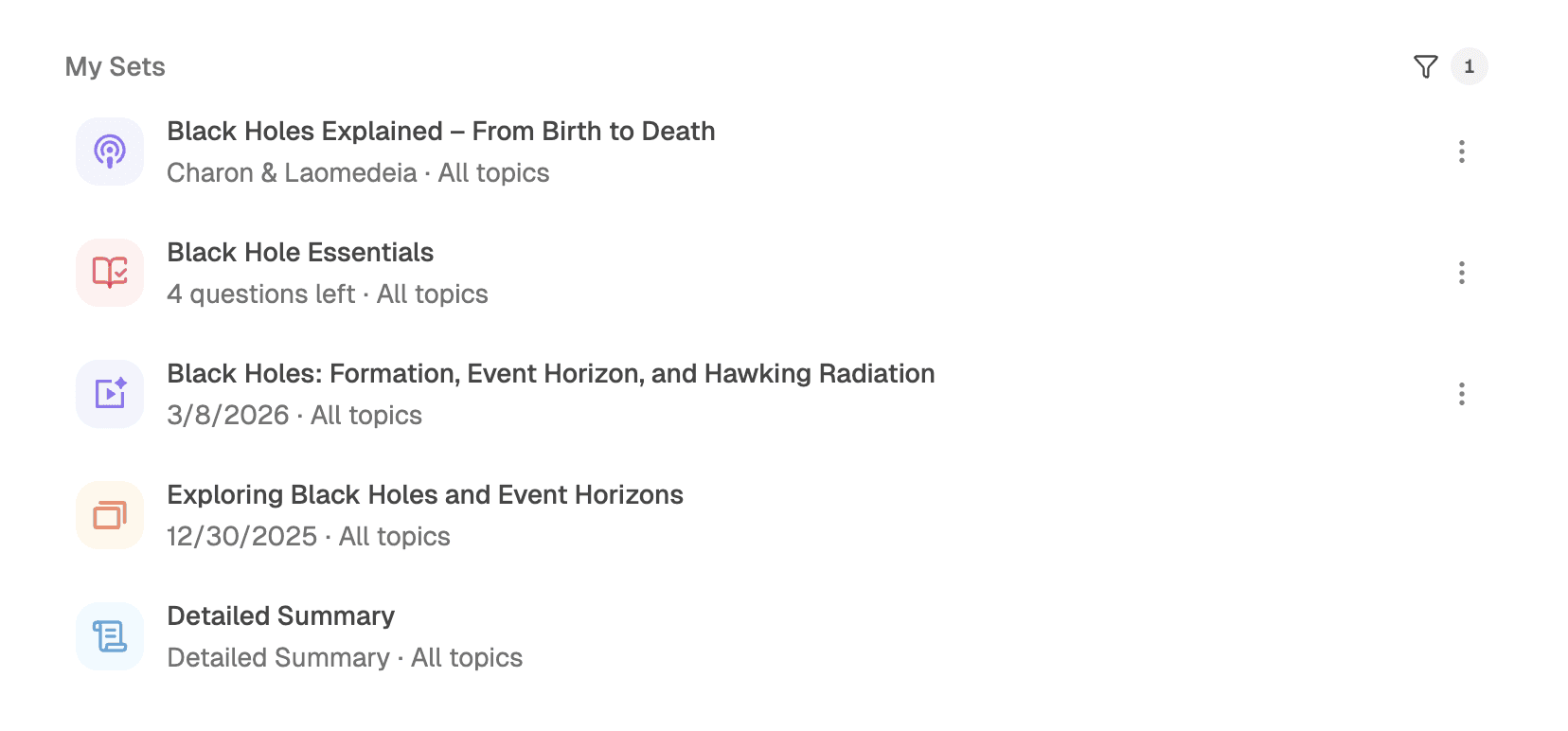
YouLearn begins with source material. The application can work with PDFs, slides, text, YouTube links, websites, audio, video, photographs, and recorded lectures. From that source, it can produce several forms of study output: concise notes, detailed summaries, interactive AI tutoring, flashcards, quizzes, personalized practice exams, podcast-style audio, and other organized review sets.
This source-first design is important. A general chatbot may explain a topic well, but it does not automatically know the wording, examples, definitions, or emphasis used by a specific professor. YouLearn is designed to ground the study experience in uploaded material. That can make questions more relevant to the class, although students should still verify every important answer against the original source.
The complete workflow, step by step
1. Upload, paste, link, or record
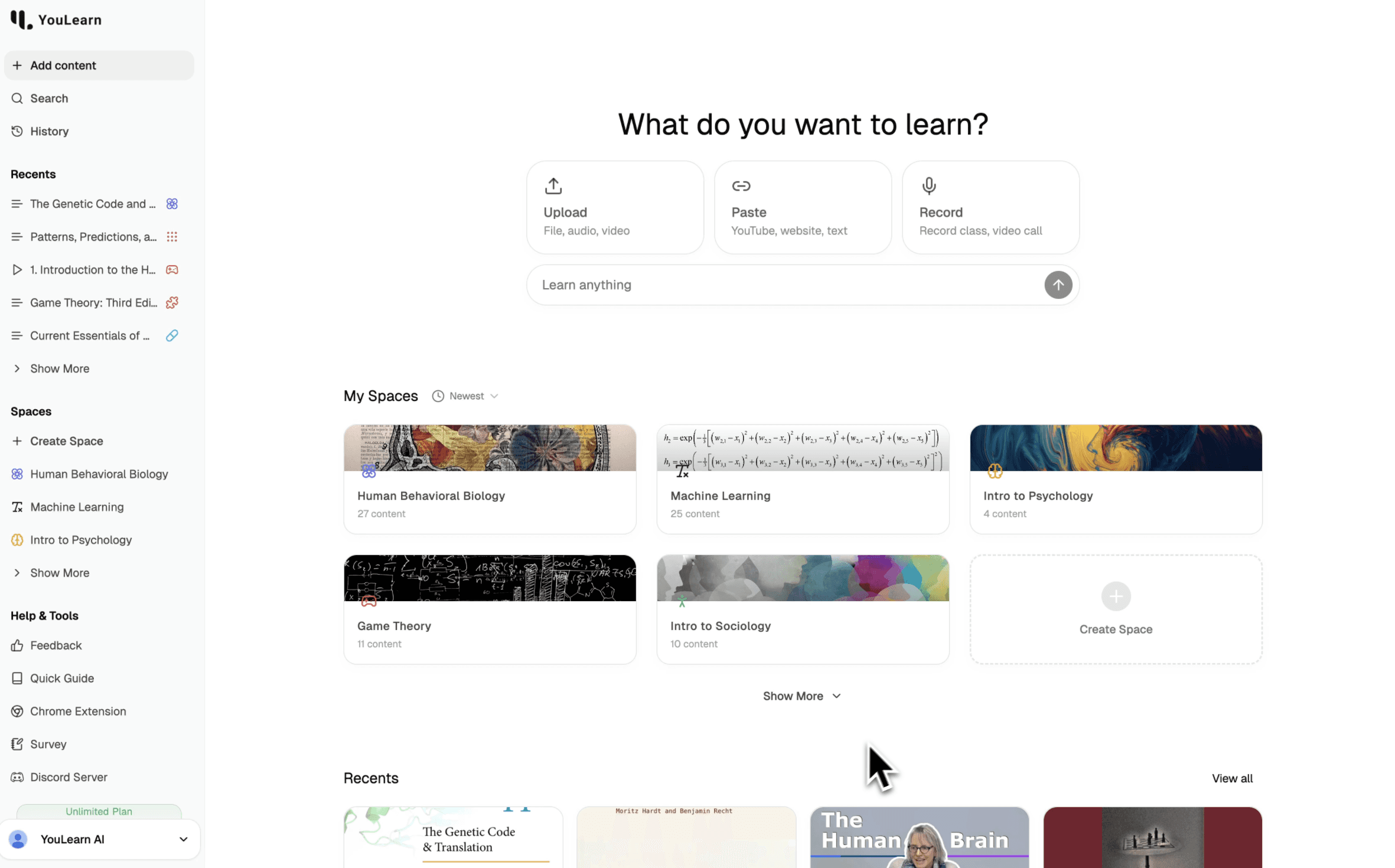
The home screen offers several entry points. A learner can upload a file, audio, or video; paste a YouTube link, website, or copied text; or record a lecture or call. This flexibility is one of the product’s strongest features because real courses rarely arrive in one clean format. A single subject may include textbook chapters, presentation slides, recorded lectures, handouts, and external videos.
2. Let YouLearn process and organize the material
Once content is added, YouLearn analyzes it and creates a structured learning item. Longer videos can be divided into chapters, recorded speech can be transcribed, and dense files can be converted into navigable summaries. Materials can also be grouped into learning spaces so a student can separate subjects, courses, projects, or exam units.
3. Review the summary and source structure
The summary provides an overview of the main concepts before deeper study. This can be useful for orientation, especially when facing a long chapter or lecture. However, summaries should not become the entire study method. They reduce information, and the reduction process may omit details that an instructor considers important.
4. Chat with the AI tutor
Students can ask questions about the material, request simpler explanations, compare concepts, or explore a confusing section. YouLearn’s interface emphasizes source-aware responses and references. The tutor is most useful when the learner asks focused questions such as “Why does this mechanism produce that result?” rather than only requesting another summary.
5. Generate active-recall materials
Flashcards, quizzes, and practice tests turn the source into retrieval practice. This is where YouLearn can be more valuable than a summary-only application. Students can attempt questions, review answer breakdowns, identify weak areas, and create targeted follow-up study sessions.
6. Use audio and mobile review
Podcast generation allows a learner to review material while commuting, walking, or completing routine tasks. YouLearn is also available through web and mobile apps, making it easier to move between desk study and short review sessions. Audio works best as reinforcement after a first pass through the material, especially when diagrams or formulas are involved.

AI tutor chat and source-grounded answers
The AI tutor is the center of the product. Instead of opening a separate chatbot and repeatedly explaining the context, learners can ask questions inside the study item. The assistant can simplify an explanation, define terms, compare theories, identify the relationship between sections, or help the user work through a difficult concept.
Source grounding can reduce—but not eliminate—the risk of inaccurate answers. AI may still misunderstand an image, infer beyond the uploaded material, combine unrelated passages, or express uncertainty too confidently. For high-stakes subjects, students should open the cited section, verify terminology, and compare the response with instructor materials or an authoritative textbook.
Best prompts for the tutor
- “Explain this concept at three levels: beginner, intermediate, and exam-ready.”
- “Which part of the source supports this answer?”
- “Compare these two theories in a table and include one example from the lecture.”
- “Ask me one question at a time and do not reveal the answer until I respond.”
- “Identify the assumptions I need to understand before this section.”
Notes and summaries
YouLearn can turn long materials into concise notes and structured summaries. This is useful for previewing a chapter, rebuilding missed lecture notes, and creating a revision outline. A student who uploads a ninety-minute lecture can quickly identify the major sections before deciding where to spend deeper study time.
The risk is over-trust. A clean summary can feel complete even when it has removed nuance, exceptions, diagrams, evidence, or instructor emphasis. The best workflow is to use the summary as a map, then revisit the source for important details and add personal annotations.
Flashcards and spaced review
Automatically generated flashcards remove much of the setup work that prevents students from using retrieval practice. Definitions, processes, comparisons, dates, and cause-and-effect relationships can be converted into question-and-answer cards. This is especially helpful for terminology-heavy subjects.
Generated cards still need editing. Some may be too easy, too broad, duplicated, or based on a minor detail. Students should remove low-value cards, rewrite ambiguous prompts, and add course-specific examples. AI generation is most effective as a fast first draft rather than a fully trusted final deck.
Quizzes, practice tests, and weak-spot review
YouLearn can create quizzes and personalized practice exams from the uploaded material. The official product documentation also describes answer breakdowns, progress tracking, and targeted review based on performance. These tools move the learner beyond passive reading and create opportunities for recall under pressure.
Practice questions are useful only when their quality is high. Students should watch for questions with multiple plausible answers, unclear wording, unsupported facts, or answers that depend on information outside the source. For professional or standardized exams, YouLearn should complement—not replace—official question banks and instructor-approved materials.
Podcast and audio study content
The podcast feature converts notes, slides, PDFs, recorded lectures, or videos into conversational audio. This extends study time into situations where reading is difficult. It can also provide a different explanation style, which may help learners who benefit from hearing relationships between ideas.
Audio has limitations. It is poorly suited to complex equations, visual anatomy, diagrams, tables, and content where precise spelling matters. A good sequence is to read or watch the original material first, listen to the generated podcast for review, and then complete a quiz immediately afterward.
Learning spaces and organization
YouLearn organizes related content inside spaces. A space can represent a course, subject, research project, or exam unit. This makes the platform more than a one-file summarizer: multiple materials can be kept in a persistent learning environment, with recent content and generated study sets accessible from the same account.
Organization matters most during long courses. Without clear naming conventions, AI study libraries can become as difficult to navigate as a folder full of PDFs. Use consistent titles, separate current and archived materials, and group content according to the structure of the syllabus.
Supported material types
- PDF files and textbook chapters
- Lecture slides and presentations
- YouTube videos
- Websites and pasted text
- Audio and video files
- Recorded lectures or calls
- Photos and scanned notes, depending on readability
Input quality affects output quality. Clear audio, complete chapters, readable scans, and well-structured files generally produce better notes and questions than fragments without context. A student should also confirm that they have permission to upload copyrighted, private, or institutional materials.
YouLearn pricing in 2026
YouLearn’s current published information describes a Free plan, a Pro plan, and a higher Max tier referenced in the company’s 2026 product comparisons. Prices and limits can change, so confirm the live checkout before subscribing.
Free plan
The current terms describe up to three uploads, pastes, or recordings per day; five AI text chats per day; ten quiz answers per day; two practice exams per month; five AI voice chats per day; and uploads up to 100 pages or 10 MB. YouLearn’s own 2026 blog articles show slightly different quiz allowances in some places, so the account dashboard should be treated as the final source for active limits.
Pro plan
Pro is listed at $20 per month when billed monthly or $12 per month when billed annually. The plan removes many everyday limits, supports files up to 2,000 pages or 300 MB, and includes priority support. For students processing textbooks, long lecture recordings, and repeated exam practice, this is the most logical paid tier.
Max plan
YouLearn’s official 2026 comparison content lists Max at $75 per month or $45 per month on annual billing, with higher allowances for power users. This is likely excessive for an average student and should be considered only when Pro limits are demonstrably restricting a heavy workflow.
Student discount
The terms state that students with a valid .edu email address can receive a 20% discount on Pro. Students outside the United States may need to contact support for alternative verification.
Trial, cancellation, and refund conditions
The current terms describe a seven-day free trial with full access that automatically renews if it is not canceled before the end of the trial. They also describe a seven-day money-back window for the first direct web payment. Renewals are generally non-refundable, and App Store purchases follow Apple’s refund process. Users should record the renewal date and cancel through account settings before the next billing date when they do not wish to continue.
Privacy, ownership, and sensitive materials
YouLearn’s terms state that users retain ownership of PDFs, recordings, video links, and other uploaded materials while granting the company permission to process and analyze those materials to provide the service. The terms also describe generated study materials as available for personal, non-commercial learning use within plan limits.
Students should avoid uploading confidential exams, patient data, privileged legal documents, proprietary company materials, or content they do not have permission to process. The terms specifically state that the platform is not tailored to regulations such as HIPAA or FISMA. Schools and organizations should conduct their own privacy and procurement review before institutional use.
Accuracy and academic integrity
YouLearn can accelerate study preparation, but it cannot guarantee that every summary, flashcard, or answer is correct. AI-generated output may omit qualifications, invent a connection, misread a diagram, or create a flawed multiple-choice question. The learner remains responsible for verification.
Academic-integrity rules also vary by school and course. Using AI to create private study aids may be allowed while submitting generated answers, summaries, or writing may not be. Students should follow instructor policies and use the system as a tutor and practice partner rather than as a shortcut around assigned work.
Mobile apps and studying anywhere
YouLearn is promoted across web, iOS, and Android. Cross-device availability is valuable for short review sessions, podcast listening, and flashcard practice away from a computer. Large-file upload and detailed editing are still likely more comfortable on desktop, while mobile is best for revision and conversational tutoring.
YouLearn vs ChatGPT
ChatGPT is more flexible as a general-purpose assistant. It can explain almost any topic, help brainstorm, and work across many tasks. YouLearn is more specialized: it builds persistent study materials from a learner’s own sources and connects summaries, flashcards, quizzes, tests, podcasts, and tutoring inside a study workflow.
A practical combination is to use YouLearn as the course-material system and a general chatbot for broader explanations or brainstorming. Students who only need occasional concept explanations may not need YouLearn Pro. Students repeatedly converting lectures and files into exam practice are more likely to benefit from the dedicated platform.
YouLearn vs NotebookLM, Quizlet, and dedicated flashcard apps
NotebookLM is strong for source-grounded research and audio overviews, while YouLearn places more emphasis on active exam preparation. Quizlet offers a huge library of existing flashcard sets, but YouLearn can generate multiple study formats directly from a new upload. Anki provides powerful spaced repetition and control, but requires more setup and does not automatically create a full study workflow from mixed course materials.
The best choice depends on the task. Choose YouLearn when one upload should become several study tools. Choose NotebookLM for research synthesis, Quizlet for established community decks, and Anki for long-term manual flashcard control.
Affiliate and paid-search note
Publishers considering YouLearn’s affiliate program should read the current terms carefully. They state that the program is invitation-only and that paid-search traffic is ineligible for commission. The terms also describe a 60-day commission hold to account for refunds and chargebacks. This is especially important for affiliates who normally promote software through Google Ads.
What YouLearn does well
- Accepts a wide range of real course materials.
- Creates several study formats from one source.
- Combines passive review with active recall.
- Supports long documents on the paid plan.
- Keeps content organized through learning spaces.
- Adds AI tutoring and source references inside the lesson.
- Provides web and mobile access.
- Offers a meaningful free entry point.
Where YouLearn falls short
- AI-generated study material still requires review.
- Plan limits and allowances are described inconsistently across some official pages.
- Pro can be expensive for light or occasional users.
- Audio and summaries can encourage passive study if used alone.
- Highly sensitive or regulated materials should not be uploaded without institutional review.
- It does not replace official exam banks, instructors, or human tutoring.
- Generated questions may not match a professor’s exact exam style.
How to get the best results
- Upload complete, clearly labeled source material rather than random fragments.
- Review the summary while keeping the source open.
- Edit generated flashcards and remove low-value items.
- Attempt a quiz before rereading to reveal genuine weak spots.
- Ask the tutor to cite the relevant source section.
- Use podcasts as review, not as the only exposure to complex content.
- Compare practice questions with instructor examples and official materials.
- Track the subscription renewal date before starting a trial.
Should you buy YouLearn?
Buy YouLearn Pro when you regularly study from long PDFs, lecture videos, recordings, and slides; want multiple study outputs; and will actively use quizzes and practice exams. The annual price can be reasonable if the platform replaces several separate subscriptions and saves repeated preparation time.
Stay on the Free plan when you only process a few materials each week or want to validate the quality of summaries and questions before paying.
Skip YouLearn when you need only a generic AI explanation, prefer fully manual flashcard control, cannot upload your materials for privacy reasons, or expect AI-generated answers to be accepted without verification.
FAQ
Is YouLearn free?
Yes. The Free plan includes limited daily uploads, chats, quiz activity, voice chat, and monthly practice exams. Active limits should be confirmed inside the current account dashboard.
Can YouLearn summarize YouTube videos?
Yes. A learner can paste a YouTube link and use the processed content for notes, chat, chapters, quizzes, and other study tools.
Can I upload a large textbook?
The current terms list up to 100 pages or 10 MB per file on Free and up to 2,000 pages or 300 MB on Pro.
Does YouLearn generate flashcards and practice exams?
Yes. Flashcards, quizzes, and personalized practice exams are central parts of the product.
Does YouLearn replace a tutor?
No. It offers instant explanations and practice, but a human tutor can provide deeper diagnosis, motivation, context, and accountability.
Is YouLearn safe for confidential documents?
Users should review the privacy policy and terms before uploading sensitive material. The service is not presented as tailored to regulated environments such as HIPAA.
Can affiliates run Google Ads for YouLearn?
The current terms say paid-search traffic is ineligible for affiliate commission and the affiliate program is invitation-only.
Final verdict
YouLearn is a well-focused AI study platform that goes beyond document chat. Its strongest feature is the ability to turn one source into several connected learning experiences: summary, notes, tutoring, flashcards, quizzes, practice exams, podcasts, and organized sets. That combination is particularly useful for students facing large amounts of mixed course material.
It earns 4.7 out of 5 for input flexibility, study-output variety, active-recall tools, and an accessible free plan. The final value depends on how actively the learner studies. A student who only reads generated summaries may gain little. A student who edits cards, takes quizzes, verifies citations, and repeatedly tests weak areas can obtain much more value.
The safest buying path is to begin with Free, process a representative lecture and a long PDF, inspect the accuracy of the generated materials, and then upgrade only when the daily limits interfere with a study routine.
YouLearn AI Pricing Plans and Limits
| Product / Plan | Rating | Price | Top Highlights | Visit |
|---|---|---|---|---|
| Try FirstFree | 4.9 | $0 | Up to 3 uploads, pastes, or recordings per day5 AI text chats per day2 practice exams per monthFiles up to 100 pages or 10 MB |
Start Free |
| Best for Exam PrepPro Monthly | 4.8 | $20/month | Unlimited core uploads, chats, quizzes, and examsFiles up to 2,000 pages or 300 MBPriority support20% student discount described for eligible users |
View Pro |
| Best ValuePro Annual | 4.9 | $12/month, billed annually | Same core Pro access at a lower effective rateBest for a full academic yearLarge document and recording supportConfirm annual total and renewal date at checkout |
View Annual Plan |
| Power UsersMax | 4.7 | $75/month or $45/month annual | Higher allowances for intensive workflowsDesigned for power usersUsually excessive for an average studentVerify current Max limits in live checkout |
View Max |
BUY: YouLearn is a strong buy for heavy study workflows after the free plan confirms that its summaries, tutor responses, and practice materials match your course needs.
Users retain ownership of uploaded materials while granting YouLearn permission to process them. Current terms describe generated materials as available for personal, non-commercial study use and require users to respect third-party rights.
Alternative path: Choose NotebookLM for research synthesis, Quizlet for community flashcards, Anki for manual spaced repetition, or a general AI chatbot when you only need occasional explanations.
Start Learning Free ↗What we verified
Official documentation, product terms, and current public information used in this review.
- Product type
- AI tutor and study-material platform
- Inputs
- PDFs, slides, YouTube, websites, text, audio, video, photos, recordings
- Core outputs
- Notes, summaries, tutor chat, flashcards, quizzes, practice exams, podcasts
- Free file limit
- Up to 100 pages or 10 MB per file in current terms
- Pro file limit
- Up to 2,000 pages or 300 MB per file
- Pro monthly price
- $20/month
- Pro annual equivalent
- $12/month when billed annually
- Platforms
- Web, iOS, Android
- Editorial score
- 4.7 / 5
- Review method
- Official product, pricing, terms, privacy, blog documentation, and project media