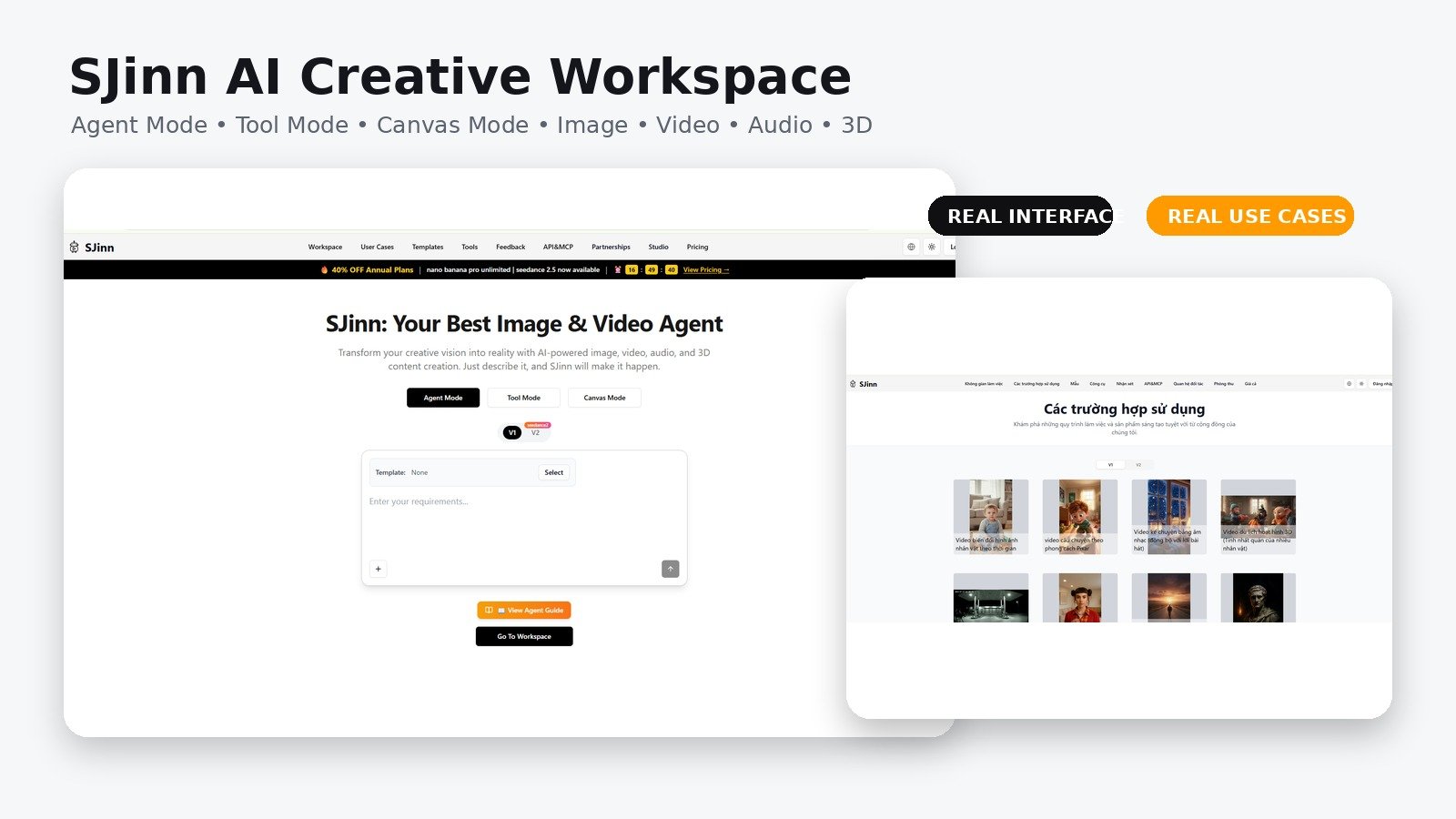
BUY — SJinn is a strong choice for users who genuinely need several AI media workflows in one account and are willing to validate real credit costs with a pilot project.
SJinn stands out by combining Agent Mode, Tool Mode, and Canvas Mode in a single multimodal workspace. It is especially appealing to users who want to move between images, videos, audio, 3D, templates, and API automation without juggling several separate tools.
Best forContent creators, marketers, agencies, and developers who want one place to test and produce across several media formats.
Think twice ifYou only need one simple generator, want fixed unlimited pricing, or require strict enterprise governance before uploading production assets.
Table of Contents
How the tool fits real work
Describe the outcome
Use Agent Mode and a template when you want SJinn to plan and execute a multi-stage creative project.
Control the model
Use Tool Mode to select the exact generator, references, duration, resolution, and quality settings.
Build a pipeline
Use Canvas or the APIs to connect repeatable steps and automate production for new inputs.
How this review was prepared: StackSelectLab evaluated SJinn through its official workspace, pricing page, tools directory, templates, Agent API, Tool API, Canvas documentation, terms, privacy policy, and project-hosted media. The screenshots and generated examples in this article are loaded directly from the image infrastructure used by SJinn. We did not run a controlled benchmark across every model, so speed, prompt accuracy, and visual consistency should be verified with your own representative project before purchasing a large credit plan.
Quick verdict: SJinn is one of the broadest AI creative workspaces for users who want images, videos, audio, lip-sync, 3D, templates, node-based workflows, and API access in one account. Its strongest advantage is choice: beginners can describe a goal to an Agent, experienced creators can select a specific model in Tool Mode, and technical teams can automate the same tools through APIs. The main trade-offs are credit forecasting, model-to-model inconsistency, and policy pages that do not always reflect the breadth of the current product.
SJinn review: the short answer
SJinn is an AI content-production platform built around three complementary ways of working: Agent Mode, Tool Mode, and Canvas Mode. Agent Mode accepts a creative objective and plans a multi-step production. Tool Mode gives direct access to individual image, video, audio, lip-sync, motion-control, and enhancement models. Canvas Mode is a visual node editor for building repeatable pipelines such as text to image to video.
The product is broader than a single image generator or text-to-video site. Its current tool and API documentation exposes models and workflows involving Seedance, Kling, Veo, Sora, Nano Banana, Seedream, GPT Image, Gemini Omni, Grok video, audio generation, image lip-sync, upscaling, image-to-3D, and composed multi-scene outputs. Templates cover practical formats such as story videos, UGC advertisements, podcasts, children’s content, consistent-character shorts, horror stories, history videos, and product ads.
Our score: 4.7/5. SJinn is a strong buy for creators and teams that genuinely need several media types and want one place to experiment with multiple models. It is less attractive when you only need one predictable tool, have strict enterprise governance requirements, or cannot tolerate credit-based cost variation.
Review scorecard
AreaScoreWhat stands out Creative range4.9/5Images, video, audio, lip-sync, 3D, upscaling, templates, and APIs in one ecosystem. Workflow flexibility4.9/5Agent, direct tools, node-based Canvas, templates, API, CLI, and MCP options. Ease of use4.6/5Accessible starting point, although the model catalog becomes complex quickly. Value for money4.6/5Good feature density, but actual value depends on the models and seconds consumed. Privacy and governance4.2/5Policies are published, but some wording appears older than the current multi-modal product.Who should use SJinn?
Strong fitWeak fit Content creators producing shorts, stories, ads, explainers, music videos, or podcasts.Users who only need occasional basic image generation. Marketing teams that need many creative variations across formats and aspect ratios.Editors requiring deterministic, frame-accurate manual control for every shot. Agencies testing several AI models without maintaining separate subscriptions and integrations.Organizations that need formal data residency, SSO, audit controls, and contractual governance before testing. Developers who want Agent API or direct Tool API access for automated production.Buyers who prefer a fixed unlimited price with no model-dependent credit calculation. Creators building repeatable multi-step pipelines in a visual node editor.Anyone expecting every generation to be client-ready without review and regeneration.The three ways to create
1. Agent Mode: describe the final outcome
Agent Mode is designed for users who think in outcomes rather than model parameters. You can request a story video, product advertisement, educational short, cinematic sequence, podcast video, or character-driven project. The Agent interprets the goal, breaks it into stages, creates or edits assets, and can combine multiple outputs into a final composition.
This approach is most valuable for longer workflows. Instead of manually deciding when to write a script, create character images, animate shots, produce audio, and assemble the final video, the Agent can plan those tasks. Its API also supports a lower-cost mode and a higher-quality mode, allowing technical users to choose between experimentation and final production.
2. Tool Mode: select the exact model
Tool Mode is the better choice when you know what you want. It exposes individual generators with their own prompts, reference inputs, aspect ratios, durations, resolutions, and model-specific controls. This avoids the uncertainty of an autonomous workflow and makes it easier to compare the same brief across different models.
A practical production process is to prototype with an economical image or video mode, lock the visual direction, and then repeat the approved prompt with a higher-quality model or resolution. SJinn’s documentation explicitly recommends testing with lower-cost settings before switching to premium generation.
3. Canvas Mode: build a reusable visual pipeline
Canvas Mode is a node-based workflow editor. Users can connect text, image, audio, and video inputs to generation nodes and control how assets move through a pipeline. A simple workflow may connect a text prompt to an image generator and then pass that image into a video model. More advanced workflows can expand a prompt with an LLM, create multiple image variations, animate the selected frame, and add an audio-driven step.
This is the feature that makes SJinn particularly interesting for repeat work. A creator can build a campaign pipeline once, change only the product image or text input, and run the same structure again. Auto-save, read-only sharing, reusable canvases, type-colored connections, and support for start/end frames make Canvas more than a decorative flowchart.
What the real workflow looks like
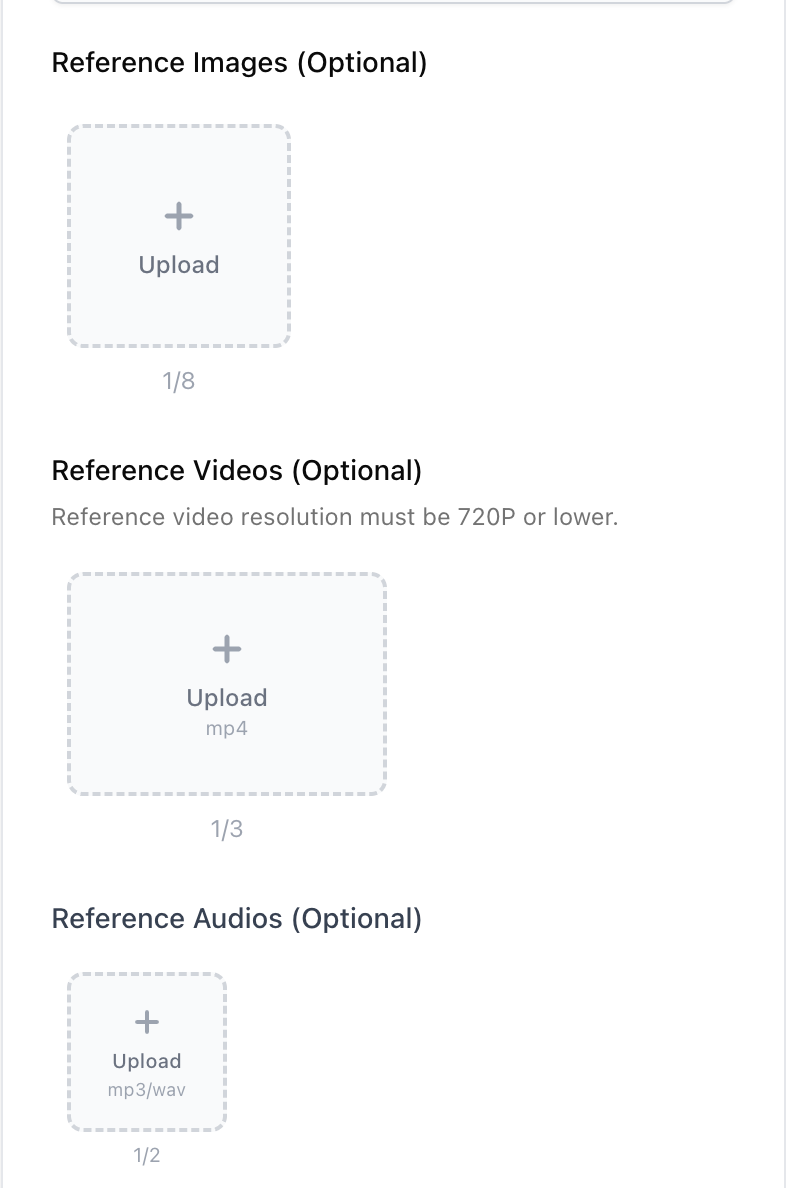
Step 1: provide reference material
Many SJinn tools accept more than a text prompt. Depending on the selected model, you can upload reference images, video clips, or audio. Seedance 2.0, for example, is presented with separate reference areas for images, videos, and audio, which helps creators communicate character appearance, camera movement, composition, timing, and sound direction.
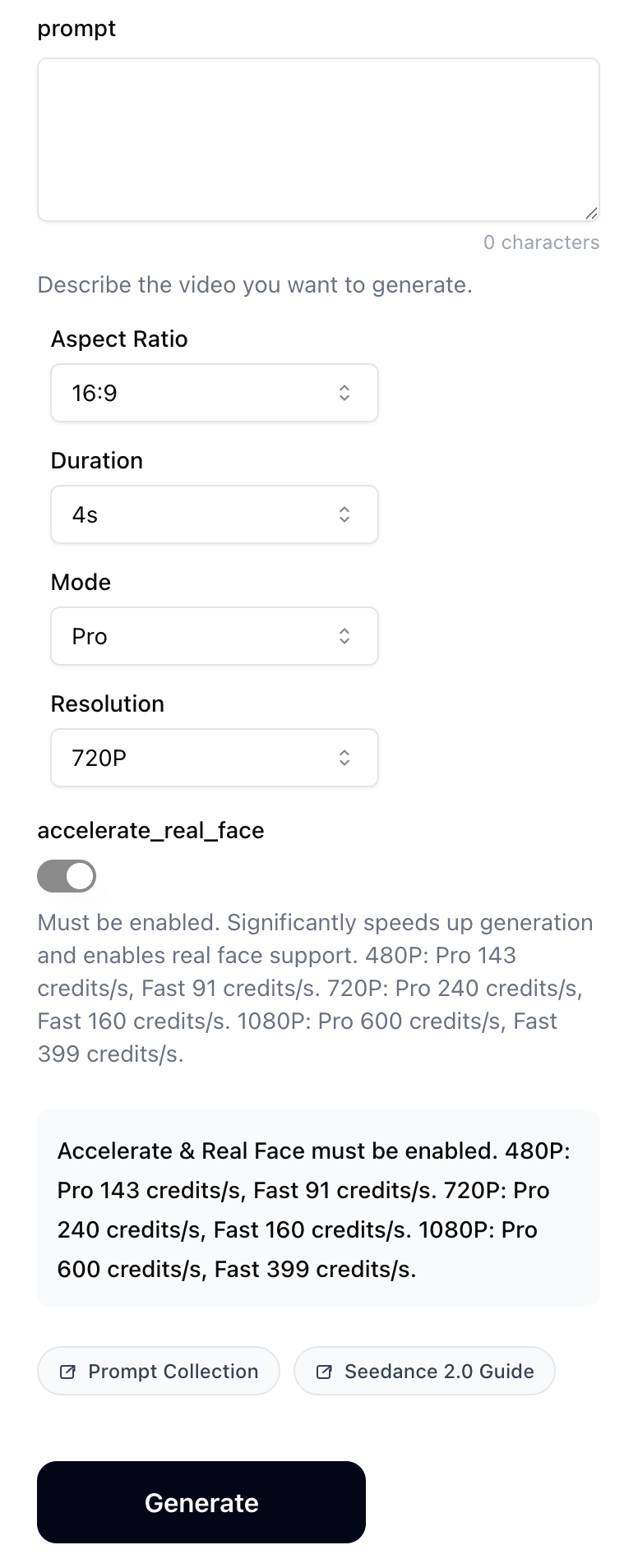
Step 2: configure the generation
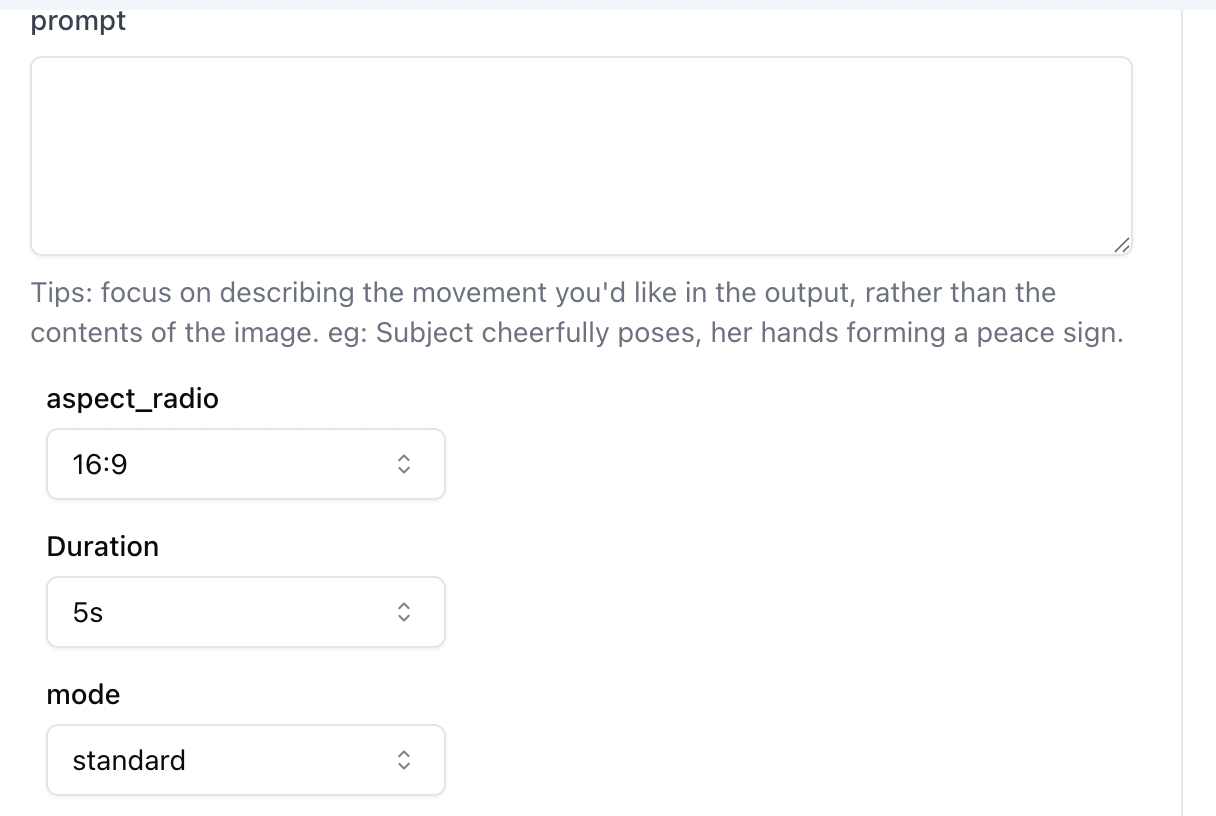
Direct tools expose the parameters that matter for production: prompt, aspect ratio, duration, model mode, and resolution. The exact choices vary by model. This is useful for platform-specific work because a marketer can create 9:16 output for Reels and TikTok, 16:9 for YouTube, or square media for feeds without rebuilding the entire concept.
Step 3: review, regenerate, upscale, or branch
A completed task is not the end of the workflow. Result cards can expose download, recreate, and enhancement actions. In Agent conversations, the Branch feature lets you return to an earlier message and explore a different creative direction without deleting the original path. This is useful when the script is approved but the art direction is not, or when a client wants two versions from the same starting brief.

Image generation and editing
SJinn’s image layer is not limited to one house model. Its current tool and API catalog includes SJinn Image, Nano Banana variants, Seedream variants, GPT Image, Flux-related options, and image-editing workflows. This makes the platform useful for concept art, product visuals, character sheets, social posts, ad variations, illustrations, and reference frames for video.
The benefit of a multi-model workspace is that no single model must handle every task. One model may be better for expressive characters, another for commercial product rendering, and another for editing an existing image while preserving identity or composition. The cost is extra decision-making. Teams should document the model, prompt, aspect ratio, reference files, and settings used for every approved visual.
Character and style consistency
Consistent characters are important for stories, branded mascots, educational series, and UGC-style campaigns. SJinn’s templates include multiple consistent-character formats, while image generators can create reference sheets and expression variations before animation begins. The best test is not a single portrait. Create front, side, full-body, action, low-light, and multi-character examples before deciding that a model is reliable enough for a series.
Product and commercial artwork
For commercial use, SJinn can be used to create campaign concepts, stylized product frames, brand characters, packaging directions, and social creatives. Generated images still require legal and factual review. Logos, product claims, celebrity likenesses, copyrighted characters, packaging text, and small typography are common failure points.
Video generation: where SJinn is strongest
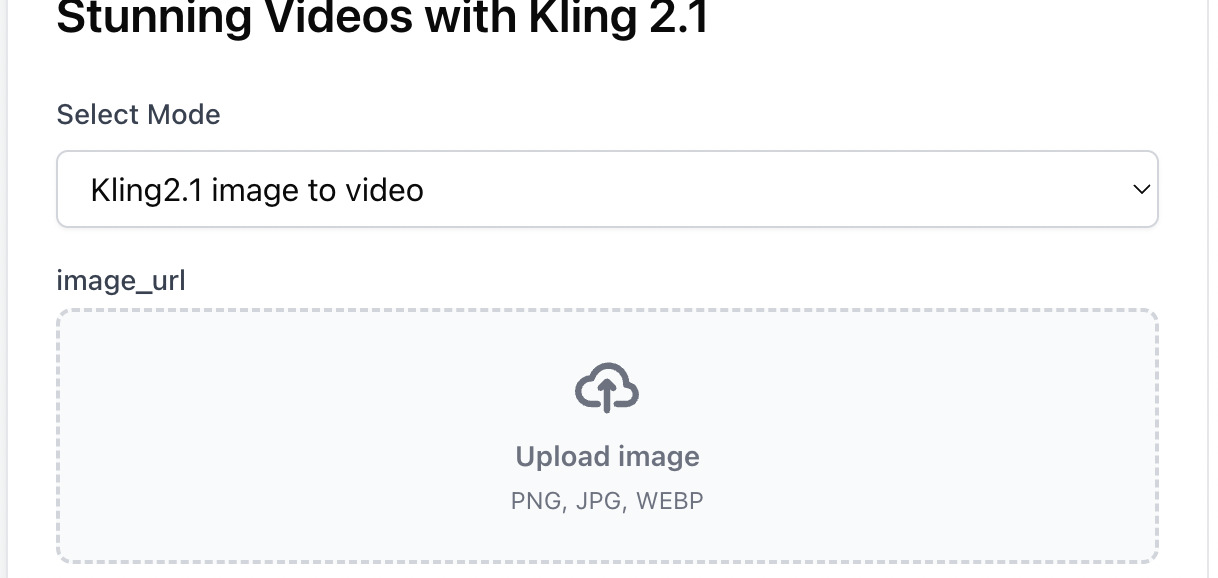
Video is the product’s most ambitious layer. The current documentation lists direct access to several families of text-to-video and image-to-video models, including Seedance, Kling, Veo, Sora, Grok, Gemini Omni, and MiniMax options. Model availability, cost, maximum duration, resolution, audio support, and reference-input limits differ, so the best model depends on the project rather than brand recognition alone.
Seedance for multi-modal input
SJinn presents Seedance 2.0 as a multi-modal generator that can use images, videos, and audio as references. That can be helpful when a text prompt alone is not precise enough. A creator may use an image to define a character, a video to communicate camera motion, and audio to guide timing or soundtrack direction.
Kling, Sora, Veo, Grok, and other options
Tool Mode and API access make model comparison possible without changing the surrounding workflow. A team can test the same shot with several models, compare motion quality and prompt adherence, and move the approved output into the next production step. This is valuable because the “best” model changes by task: product shots, human motion, animation, cinematic camera movement, and fast social variations do not have identical requirements.
Native and composed audio
SJinn’s broader toolset includes audio generation and lip-sync in addition to video. Some video models generate synchronized audio directly, while other workflows may use separate speech or sound generation and then compose the media. For dialogue-heavy content, test pronunciation, pacing, emotional tone, timing, and mouth movement before producing a long sequence.
Templates: the fastest starting point
The template library is a major usability advantage. Instead of presenting a blank prompt box, SJinn offers task structures created around specific content formats. Current examples include consistent-character story videos, UGC ads, room transformations, object-talking videos, podcast formats, motivational shorts, children’s stories, horror videos, history shorts, music-story videos, travel concepts, and multi-shot Sora projects.
Templates are most useful as repeatable production logic—not as finished creative strategy. Many users can access the same template, so differentiation still depends on the script, offer, brand assets, pacing, voice, and editing choices. Use the template to avoid technical setup, then customize the creative direction aggressively.
API, CLI, and MCP support
SJinn is not only a browser tool. Its Agent API can receive a goal, select a template, choose quality or lower-cost execution, and return project and task identifiers. The Tool API directly invokes a selected model and exposes task creation, polling, result URLs, error codes, and credit behavior. The documentation also includes CLI and MCP routes for integrating SJinn with coding agents and automated systems.
This makes the platform potentially useful for agencies and software products that need repeat generation. Examples include creating ad variations from a product catalog, generating personalized videos, building a content queue, or exposing selected media tools inside an internal dashboard.
Developers should still implement queues, retry logic, timeouts, task persistence, credit checks, and error handling. SJinn notes that failed tool tasks can trigger automatic credit refunds, but production systems should log every request and result independently.
Pricing: plans and what the credits mean
The live annual-billing view currently advertises a 40% discount and shows five levels. Promotional pricing can change, so the checkout screen should be treated as the final source of truth.
PlanAdvertised annual-view priceMonthly creditsBest fit Lite$6/month8,000Light experimentation and occasional generations. Standard$12/month20,000Regular creators who need watermark removal and core Tool Mode access. Pro$30/month60,000Frequent creators using premium image tools and several video models. Ultra$60/month120,000High-volume solo creators, agencies, and multi-campaign production. Enterprise$720/month1,200,000Teams needing management features and a customized Agent.Credits are not equal across tools
A credit balance is only meaningful after you understand model costs. The published model table shows economical image generations at tens of credits, while video can consume credits per second or per task. Examples include Nano Banana at 50 credits, SJinn Image at 30, image-to-3D at 250, image upscaling at 100, music generation at 200, and several video models that charge by duration and quality.
A 60,000-credit Pro plan could support many image tasks, but substantially fewer high-resolution video seconds. Failed attempts, alternate versions, lip-sync, upscaling, and final rerenders all increase the real project cost. Before annual billing, produce one complete representative deliverable and record every credit used from concept to final export.
Which plan should you choose?
- Choose Lite when you are learning the interface and testing occasional image or short video ideas.
- Choose Standard when you create regularly and want the most practical low-cost entry point.
- Choose Pro when premium image models and frequent video work are central to your workflow.
- Choose Ultra only after a measured pilot proves that the higher credit pool will be used consistently.
- Discuss Enterprise when team management, large-scale API usage, or a customized Agent is commercially justified.
Privacy, ownership, and policy cautions
SJinn’s privacy policy says the service may collect account information, technical data, prompts, and uploaded images. It also states that generated or transformed images may be used anonymously to improve AI models unless the user opts out. Users handling client assets, unreleased products, personal likenesses, children’s media, medical content, or confidential campaigns should review the current account controls and obtain written clarification when necessary.
The terms state that users retain rights to generated images while remaining responsible for third-party intellectual-property infringement. However, the terms page appears focused on an older image-generation version of the service and mentions a fixed image-credit cost that does not match the current multi-model pricing table. This does not automatically mean the product is unsafe, but it is a reason to confirm commercial rights, confidentiality, retention, and refund terms before enterprise or sensitive use.
What we like most
- Three distinct working styles: Agent for automation, Tool Mode for control, and Canvas for reusable pipelines.
- Broad model selection: useful when different creative tasks need different strengths.
- Multi-modal scope: image, video, audio, lip-sync, motion, upscaling, and 3D can remain in one ecosystem.
- Practical templates: creators can start from real production formats rather than an empty prompt.
- Developer access: Agent API and Tool API support automated workflows beyond the browser.
- Branching and iteration: alternate creative directions can be explored without losing the original path.
Where SJinn needs improvement
- Credit forecasting is complicated. Cost changes dramatically by model, seconds, quality, and regeneration count.
- The model catalog can overwhelm beginners. More choice is useful only after users understand the trade-offs.
- Quality is variable. A strong sample does not guarantee consistent characters, text, hands, physics, or timing across a long project.
- Policies lag behind the current product. Terms and privacy wording should better reflect the present multi-modal tool and API ecosystem.
- Traditional editing is still necessary. Final client work may require external timeline editing, sound mixing, color correction, subtitle review, and compliance checks.
SJinn versus specialized alternatives
Choose SJinn when…Choose a specialist when… You want to compare several image and video models in one workflow.You use one model exclusively and need its newest controls immediately. You need an Agent to coordinate multi-step production.You already have a mature manual production pipeline. You want Canvas, templates, API, CLI, and MCP options together.You only need a simple image editor, avatar presenter, or timeline editor. You value a shared credit pool across several creative tasks.You prefer one unlimited specialist subscription with predictable limits.A sensible seven-day test plan
- Day 1: create two images in different styles and document the models and settings.
- Day 2: animate the stronger image with two video models.
- Day 3: test a template that matches your real content format.
- Day 4: create a multi-step Agent project and note where intervention is required.
- Day 5: rebuild a small workflow in Canvas and test reuse with new inputs.
- Day 6: measure total credits, failed generations, waiting time, and external editing time.
- Day 7: compare the finished deliverable with your current tools and calculate the true cost per approved asset.
FAQ
Is SJinn only an image generator?
No. The current platform covers images, video, audio, lip-sync, 3D, enhancement, Agent workflows, Canvas pipelines, templates, and developer APIs.
Do I need technical skills?
No for basic Agent and Tool Mode usage. Canvas requires more workflow thinking, while API, CLI, and MCP integrations are intended for technical users.
Can SJinn create complete videos?
Yes. Agent workflows can plan assets and return composed video results, while individual tools can generate or animate shots. Final professional work may still need external editing and review.
Are SJinn projects private?
The platform publishes privacy information, but users with sensitive material should read the latest policy, review opt-out controls, and confirm the handling of uploads and generated media before use.
Can I use generated content commercially?
The terms indicate that users retain rights to generated images while remaining responsible for infringement. Because the product now covers more than images, commercial users should verify the latest rights for each model and media type.
What is the best starting plan?
Standard is the most balanced entry for regular creators. Lite is better for light testing, while Pro makes sense when premium image tools and repeated video generation justify the larger credit pool.
Final verdict
SJinn is a compelling creative platform because it does not force every user into one workflow. A beginner can describe an outcome to the Agent, a creator can choose a specific generator, a workflow designer can build a Canvas, and a developer can automate the same ecosystem through APIs. That range is difficult for narrower tools to match.
The platform earns 4.7 out of 5. It is especially valuable for creators, agencies, and technical teams producing several types of media and willing to test models systematically. The deciding factor is not the longest feature list; it is whether SJinn can reduce tool switching and production time at a predictable credit cost for your actual deliverables.
Recommendation: start with a measured pilot, track every credit and regeneration, and upgrade only after one complete project proves that Agent Mode, Tool Mode, or Canvas genuinely replaces parts of your existing workflow.
SJinn Pricing Plans and Real-World Fit
| Product / Plan | Rating | Price | Top Highlights | Visit |
|---|---|---|---|---|
| Low-Cost TestLite | 4.8 | $6/month, annual view | 8,000 credits/monthWatermark removalBest for light testingConfirm live checkout price |
View Plan |
| Best Entry PlanStandard | 4.9 | $12/month, annual view | 20,000 credits/monthWatermark removalUnlimited Nano Banana in Tool ModeSeedance access advertised |
View Plan |
| Most PopularPro | 4.8 | $30/month, annual view | 60,000 credits/monthPremium image-model accessUnlimited GPT Image 2 advertisedBest for frequent creators |
View Plan |
| High VolumeUltra | 4.8 | $60/month, annual view | 120,000 credits/monthPremium image-model accessWatermark removalFor agencies and heavy production |
View Plan |
| TeamsEnterprise | 4.8 | $720/month, annual view | 1,200,000 credits/monthUltra featuresCustomized team AgentTeam management |
View Plan |
BUY: SJinn is a strong choice for users who genuinely need several AI media workflows in one account and are willing to validate real credit costs with a pilot project.
Users retain rights to generated images according to the published terms and remain responsible for third-party intellectual-property compliance. Confirm rights for video, audio, and model-specific outputs before commercial deployment.
Alternative path: Choose a specialist image generator, dedicated AI video platform, avatar presenter, or conventional editor when you need deeper control in one narrow category rather than a broad multi-model workspace.
Try SJinn ↗What we verified
Official documentation, product terms, and current public information used in this review.
- Product type
- Multi-model AI creative agent and workflow platform
- Creation modes
- Agent Mode, Tool Mode, Canvas Mode
- Media types
- Image, video, audio, lip-sync, 3D, and enhancement
- Starting annual-view price
- $6/month for Lite
- Developer options
- Agent API, Tool API, CLI, and MCP
- Pricing model
- Membership plus model-dependent credits
- Editorial score
- 4.7 / 5
- Review method
- Official workspace, docs, pricing, policies, tools, templates, and project media