BUY — SciSummary is a strong specialist research assistant with practical citation, figure, multi-document, and library tools at an accessible published price.
SciSummary combines structured paper summaries, cited document chat, multi-paper synthesis, figure analysis, citation generation, and an organized research library.
Best forResearchers, graduate students, academics, and technical professionals who need a citation-aware first pass through scientific literature.
Think twice ifYou require offline or self-hosted processing, a complete systematic-review platform, or guaranteed error-free summaries.
Table of Contents
How the tool fits real work
Import and structure the paper
Add a file, URL, raw text, Zotero item, or database result, then choose the summary mode and page range.
Interrogate and verify
Ask questions, inspect figures, and follow inline citations back to the relevant source location.
Synthesize and organize
Compare documents, combine summaries, and manage the research library with folders, tags, and semantic search.
Editorial approach: This review is based on SciSummary's official website, tutorials, pricing information, privacy policy, terms, and product documentation. We did not commission a laboratory benchmark or upload confidential research. AI-generated summaries can contain errors, so important claims should always be checked against the original paper.

Quick verdict
SciSummary is a strong specialist tool for researchers, students, academics, and technical professionals who regularly need to screen dense papers before deciding what deserves a full read. Its advantage is not simply that it produces a shorter version of a PDF. The platform connects structured summaries with inline citations, document chat, multi-paper synthesis, figure analysis, citation generation, and a research library designed around folders and tags.
The fit is strongest when a user already has papers to evaluate and wants a faster first-pass workflow without losing the path back to the source. It is less suitable as an unquestioned authority, a fully offline research environment, or a complete substitute for systematic-review methodology. SciSummary itself states that large language models can produce incorrect results and provides citations so users can verify generated content.
What SciSummary is designed to do
SciSummary is an AI-powered service built specifically for scientific and academic documents. The official product information describes a workflow that accepts uploaded files, public article URLs, raw text, Zotero imports, and searches from an article database. It can produce summaries at different lengths, work in more than 130 languages, and focus on selected page ranges when only part of a document matters.
This specialization creates a clearer buying proposition than a general chatbot. A researcher is not beginning with an empty conversation and inventing a prompt from scratch. The product is organized around documents, sections, figures, references, and a persistent library. That structure can reduce setup time and make the result easier to audit, although it does not remove the need for subject knowledge or source verification.
Core summarization workflow
The standard workflow starts by adding a paper, choosing a summary format and length, and then reviewing an output connected to the source. SciSummary's section mode preserves the paper's structure by separating areas such as the abstract, introduction, methods, results, and discussion. A general summary gives a compact overview, while key-points and simplified modes support faster screening or less technical audiences.
Other documented modes go beyond a conventional abstract. Users can request a summary centered on a defined area of focus, identify possible future-research opportunities, create a reader-friendly blog post, generate a Socratic-style audio program, or produce presentation slides in an IMRAD structure or a custom three-, six-, or nine-slide format. These are useful output options, but the scientific reliability of any transformed format still depends on checking the original text.
Multi-document synthesis and comparison
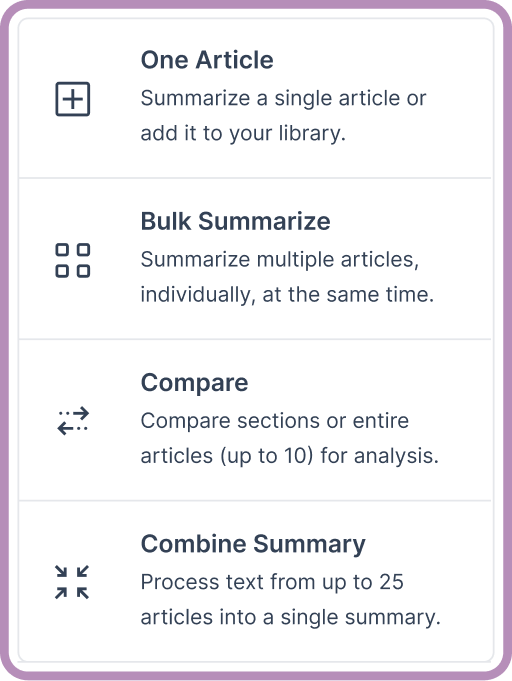
SciSummary becomes more distinctive when the workflow expands beyond one paper. Its official tutorial says users can process as many as 200 documents in an individual-summary batch, combine as many as 25 documents into one unified summary, and compare as many as 10 documents at once. Comparisons can focus on a section such as methods or results, cover entire documents, or use a specified topic as the center of analysis.
These limits are generous enough for screening assignments, class projects, exploratory literature maps, and the early stages of a research review. They should not be confused with a complete systematic-review pipeline. Search strategy, inclusion criteria, duplicate handling, quality assessment, data extraction, and reproducibility still require a documented human process or a dedicated evidence-synthesis platform.
Chat with papers and verify the answer
The document-chat interface lets users ask questions about one or several uploaded papers. According to the official guide, answers are generated within the document context and include citations that point back to the relevant location. The interface can also return figures, tables, and diagrams when they help answer a question, and responses can be requested as markdown, plain text, a table, or another structured format.
Citations are one of the product's most important safeguards. Summary paragraphs and chat answers can link back to their source location, and a user can select generated text and use the Cite This function to inspect where it came from. SciSummary also generates reference lists in APA, Chicago, MLA, and Harvard formats. This traceability is valuable, but a citation link proves where an answer was derived; it does not guarantee that the model interpreted the passage correctly.
Figures and tables
Scientific findings often depend on visual evidence that a text-only summary can miss. SciSummary documents automatic extraction of tables, charts, graphs, and diagrams from uploaded papers. It can explain a visual in the context of the study, highlight patterns, and answer natural-language questions about the figure. If an item is missed, users can manually upload an additional PNG, JPG, or PDF for analysis.
This is especially useful for quickly locating the result that drives a paper's conclusion. However, users should still examine axes, units, sample sizes, uncertainty, statistical tests, legends, and study design. A clear explanation of a chart is not a replacement for evaluating whether the chart supports the claim being made.

Research library and organization
SciSummary includes a persistent library rather than treating every upload as a disposable session. Users can create folders, move papers with drag-and-drop or batch actions, assign multiple tags, filter by tags, and use colors to mark topic, priority, or review status. Folder-level workflows can summarize several papers, combine them into a single overview, recommend related reading, or open a chat across the folder.
This makes the service more practical for an ongoing thesis, course, lab project, or research brief. The organizational layer is still lighter than a mature reference manager, so many users may continue using Zotero for their canonical bibliography and use SciSummary for AI-assisted reading. The built-in Zotero import helps connect those roles without requiring the researcher to abandon an established library.
Semantic search and discovery
The current Pro plan lists semantic search across as many as 1,000 indexed documents. Semantic retrieval is useful when the exact wording of a remembered finding is unknown: a concept-based query can surface a relevant paper even when its title does not contain the same words. Article search is also included in the trial and paid plans.
Search results should be treated as discovery assistance rather than proof of completeness. For formal academic work, continue documenting databases, queries, dates, filters, and inclusion decisions. A personal semantic index is valuable for navigating a collection but does not automatically provide the coverage or reproducibility required by a rigorous literature review.
Pricing and plan value
SciSummary currently advertises a seven-day free trial with 30,000 words of summaries, five AI-analyzed figures, 100 chat messages, unlimited article searches, and up to 50 quick imports. Its official AI information page lists Pro at $4 per month when billed as $48 per year, or $7 when billed monthly. Pro includes unlimited summaries, figure analysis, chat messages, quick imports, and semantic indexing for 1,000 documents, subject to the provider's current fair-use and plan terms.
A student promotion is also advertised as a free first month with the code STUDENT26, followed by standard pricing. Because promotions, eligibility, taxes, currencies, and renewal terms can change, confirm the final checkout amount before subscribing. The separate bulk-summarization API is usage based and is listed at $0.0037 per 1,000 tokens; API billing should not be assumed to be included in a normal Pro subscription.
The price is competitive for a specialist workflow if the tool replaces repeated manual screening or several disconnected summarization steps. Value will be weaker for someone who reads only a few papers each month, needs only citation storage, or already has equivalent capabilities inside an institutionally funded platform.
Privacy, data handling, and reliability
Using SciSummary can involve uploading unpublished papers, reports, or other documents to a hosted service. The official privacy policy says the service may collect account information and usage data, uses providers that can include Google Analytics, Mailgun, and Stripe, and processes information in the United States. The policy also states that no internet transmission or storage method can be guaranteed completely secure.
Before uploading confidential, regulated, embargoed, client-owned, or commercially sensitive material, check the current privacy policy, terms, institutional rules, publisher conditions, and any required data-processing agreement. Use public or non-sensitive papers during evaluation. SciSummary requires an internet connection, although summaries can be downloaded for offline reference.
The product's terms explicitly warn that AI-generated summaries are not always entirely accurate and instruct users to verify generated content before applying it. That limitation is not unique to SciSummary, but it matters more in research, medicine, engineering, and policy work where a compressed error can change the meaning of a result.
Ease of use
The product's document-centered design should be approachable for users who already understand PDFs, folders, and citation lists. Multiple import paths reduce the need to reformat a source, and summary modes give the user a defined starting point. The 200 MB upload limit is sufficient for most papers, though the FAQ cautions that very large files may produce unexpected errors.
The learning curve moves from basic summarization to workflow design. A user still needs to decide which output mode fits the task, how to name and organize folders, which claims must be verified, and where approved notes or citations will live. Teams should test export, account cancellation, access ownership, and the treatment of uploaded data before the tool becomes part of a critical process.
Strengths
- Purpose-built workflow for scientific and academic documents rather than a blank general-chat interface.
- Inline source citations make generated summaries and chat answers easier to verify.
- Strong multi-document options for batch summaries, combined synthesis, comparison, and chat.
- Figure analysis, citation generation, Zotero import, folders, tags, and semantic search form a coherent research workspace.
- Low published Pro pricing relative to the breadth of the documented feature set.
Limitations
- AI-generated content can still be inaccurate, incomplete, or overconfident.
- The service requires an internet connection and a hosted-document workflow.
- It does not replace human critical appraisal or a reproducible systematic-review process.
- The privacy policy and contractual terms need careful review before sensitive or unpublished material is uploaded.
- Promotions, unlimited-use conditions, API charges, and future plan limits should be verified at checkout.
Who should choose SciSummary
SciSummary is best suited to graduate students, researchers, academics, science communicators, clinicians reviewing public literature, and technical professionals who repeatedly need to screen or compare papers. It is especially compelling when inline citations, figure analysis, and multi-paper synthesis reduce the time between finding a source and deciding whether to read it in full.
Who should consider another route
Choose a different or complementary product if the primary need is comprehensive evidence discovery, a formal systematic-review workflow, offline or self-hosted processing, enterprise data controls, or long-term reference management without AI summarization. Elicit may fit structured evidence discovery, NotebookLM may fit source-grounded notebook workflows, and Zotero remains a strong canonical reference library. A general AI assistant can be more flexible, but it may require more manual prompting and source management.
A practical evaluation workflow
- Select three public papers you already understand: one simple, one methods-heavy, and one containing important figures.
- Generate a section summary and check every major claim against the original pages.
- Ask the same factual question in document chat and inspect the inline citations.
- Compare two papers by methods and results, then note any omitted qualification or conflict.
- Test a figure explanation against the caption, axes, units, and statistical notes.
- Import a small Zotero collection, organize it with folders and tags, and export a citation list.
- Estimate the twelve-month cost and review privacy, cancellation, and data-handling requirements.
This test produces a more useful decision than judging a polished example supplied by the vendor. Record the time saved, the number of corrections required, and whether citations make verification genuinely faster.
Frequently asked questions
Is SciSummary free?
It offers a seven-day trial with defined AI limits, and the official FAQ says non-AI features can be used without a credit card. Continued unlimited summarization requires an active paid subscription after the applicable trial or promotion.
Can SciSummary summarize non-academic documents?
Yes. The official FAQ says reports and technical papers can also be summarized, although the product is optimized for academic papers.
Does SciSummary support Zotero?
Yes. Papers can be imported from Zotero when adding articles, making it possible to keep Zotero as the reference library while using SciSummary for AI-assisted reading.
Can it replace reading the original paper?
No. A summary is a screening and navigation aid. Methods, limitations, definitions, statistics, and claims that affect a decision should be reviewed in the original source.
Can summaries be used offline?
The service requires an internet connection, but completed summaries can be downloaded for offline reference.
Final verdict
SciSummary earns 4.8 out of 5 in the StackSelectLab evidence-led scorecard. It combines focused academic summarization with unusually practical verification and organization features at an accessible published price. The strongest reasons to choose it are structured outputs, inline citations, multi-document analysis, figure support, and a workflow that stays centered on research papers.
The recommendation remains conditional: verify important output against the source, evaluate privacy before uploading sensitive documents, and do not treat a convenient synthesis as a substitute for critical appraisal. For users who accept those boundaries and process research literature every week, SciSummary is a strong buy.
SciSummary Pricing Plans & Features
| Product / Plan | Rating | Price | Top Highlights | Visit |
|---|---|---|---|---|
| Try FirstFree Trial | 4.7 | $0for 7 days | 30,000 words of summaries5 AI-analyzed figures100 chat messages |
Start Free Trial |
| Best ValuePro Yearly | 4.9 | $4/month, billed $48/year | Unlimited summaries, figures, and chatUnlimited quick importsSemantic search for 1,000 documents |
View Yearly Plan |
| FlexiblePro Monthly | 4.8 | $7/month | Same documented Pro feature setNo annual billing commitmentConfirm current fair-use terms |
View Monthly Plan |
BUY: SciSummary is a strong specialist research assistant with practical citation, figure, multi-document, and library tools at an accessible published price.
Current pricing context: seven-day free trial; Pro $4/month billed $48 yearly or $7 billed monthly. Confirm promotions, taxes, usage conditions, renewal terms, and API charges before purchase.
Alternative path: Consider Elicit for structured evidence discovery, NotebookLM for source-grounded notebooks, Zotero for reference management, or a self-hosted workflow when data control is the priority.
Try SciSummary Free ↗What we verified
Official documentation, product terms, and current public information used in this review.
- Pricing context
- 7-day trial; Pro $4/month yearly or $7 monthly
- Editorial score
- 4.8 / 5
- Best for
- Researchers and students screening scientific literature
- Import options
- Files, public URLs, raw text, Zotero, and article search
- Language support
- More than 130 languages
- Review method
- Official documentation and workflow analysis